
Formats
Native .et/.ett/.ets plus .xls, .xlsx, .xlsm, .xlt, .xltx, .xltm, .xlsb, .csv. Also listed in Store docs: DBF, DIF, and various data-source connections.
Formulas and analysis
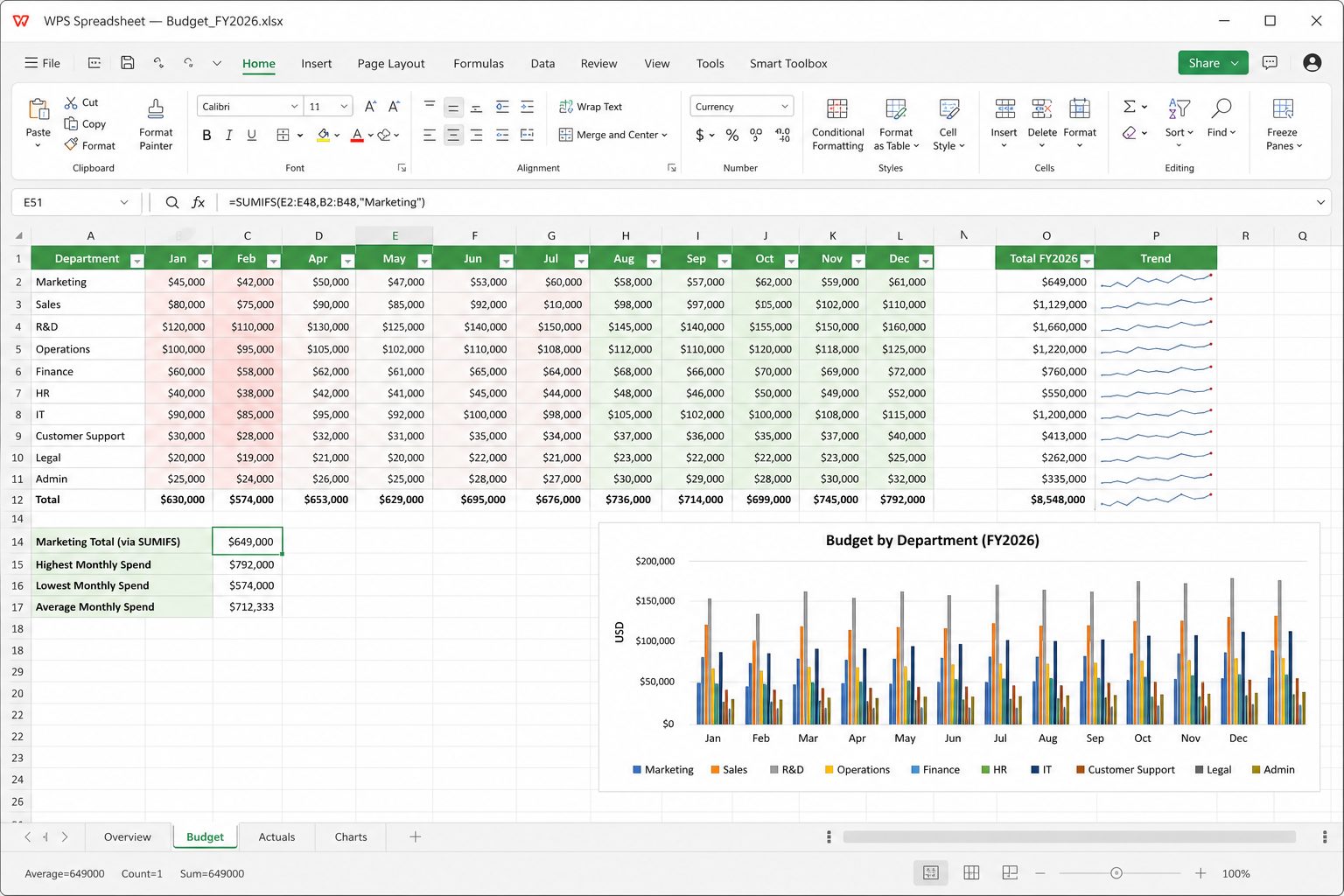
Kingsoft advertises hundreds of formulas and advanced spreadsheet tools. For day-to-day work you get the Excel vocabulary: SUM, IF, VLOOKUP/XLOOKUP (availability varies by version — test), INDEX/MATCH, SUMIFS, text functions, dates, and pivot-style summaries. Charts cover the usual column/bar/line/pie set.
Where Excel 365 still leads: dynamic array spill formulas as a first-class lifestyle, Power Query, Power Pivot data models, and some third-party add-ins. If your workbook is a Power Query monument, do not migrate it on a Friday afternoon.
Macros / VBA
WPS is not a drop-in VBA clone. Users often need a separate macros package (community and help threads mention installing a VBA component for version 6.0+). Treat .xlsm from the internet as untrusted regardless of suite. Enable macros only for workbooks you wrote.
Field tips
- Save mission-critical models as XLSX, not ET, unless everyone has WPS.
- Watch thousand-separator and date locales when you round-trip CSV.
- Freeze panes and tables (ListRange-style) before you sort, same hygiene as Excel.
- AI formula help exists on paid AI plans — still verify against a known total.
Deep dive: formulas people actually type.
Spreadsheet hygiene that saves weekends
- One header row. Filters, sorts, and SUMIFS all assume it. Merged header cells are how sorts eat the wrong block.
- Dates as dates. CSV from banks often arrives as text. Never sort a “date” column that is actually left-aligned text — January will not be where you think.
- Freeze panes on the header before you scroll 5,000 rows. Same as Excel.
- Do not compute on the same range you paste raw dumps into. Raw sheet + Calc sheet. When the dump refreshes, you do not nuke formulas.
Lookups: what to type in 2026
INDEX/MATCH still survives round-trips better than whatever dynamic-array fashion your Excel 365 colleague used last month. SUMIFS is the budget workhorse. XLOOKUP / FILTER / UNIQUE: test on your exact WPS build before you rewrite a production file. If a formula shows #NAME?, it is not “broken math” — it is a function WPS does not know.
CSV: the silent killer
Save CSV as UTF-8 if you have names with accents, Arabic, or Chinese. Excel on another PC may still guess the code page wrong; if so, import via Data → From Text and pick UTF-8 explicitly. Thousand separators: 1.234,56 vs 1,234.56 — pick one locale and stick to it or SUM will treat commas as text.
Pivots and charts
Pivot-style summaries exist and are enough for a classroom gradebook or a monthly spend rollup. They are not Power Pivot data models. Charts: column/bar/line/pie cover 90% of office life. If you need combination charts with two axes, build it and immediately open the XLSX in Excel to see if the chart XML survived.
Big files
WPS is lighter than 365, but a 40 MB sheet with volatile formulas (OFFSET, INDIRECT, whole-column VLOOKUP) will still melt a 4 GB machine. Replace whole-column refs with tables. Turn off automatic calc while you paste, then calc once. Keep the file on a local SSD, not a flaky Wi-Fi share.
Protection and sharing
Sheet protection and workbook passwords exist; they are not military encryption. Do not put payroll in a “locked” XLSX and email it. Mobile is for checking a number, not for rebuilding a 30-sheet model on a phone.
Formulas cheatsheet: what to memorize. Macros warning stands: enable only on workbooks you wrote.
Build a sheet like an adult
Row 1 is headers, never a title merged across A1:Z1 (put the title in the header of the print page or in A1 unmerged above a blank row you hide later). One data type per column: text, date, number, currency. No “Q3 / see note” in a money column. Notes go in a Comments column. Color is not data; color-blind colleagues and printouts lose it. If you must flag rows, add a Status column with values OK / RISK / HOLD and filter on that.
References you will not regret
A2 relative, $A$2 absolute, $A2 mixed. F4 cycles them while editing. Whole-column A:A in SUMIFS feels clever until the file is 40 MB. Prefer a table or a bounded range A2:A5000. Named ranges (Formulas → Name manager) for tax rates and VAT: =Net*(1+VAT) is readable; =B2*(1+$Z$99) is a treasure hunt.
Errors, translated
| You see | It usually means | What to do |
|---|---|---|
| #DIV/0! | Division by zero or empty | IF or IFERROR around the ratio |
| #N/A | Lookup found nothing | IFNA, or your key has a trailing space — TRIM the keys |
| #VALUE! | Wrong type (text in math) | VALUE(), or the cell is apostrophe-prefixed text |
| #REF! | You deleted a row a formula pointed at | Undo. Then stop deleting source columns |
| #NAME? | WPS does not know that function | It is probably a 365-only function. Rewrite |
| ###### | Column too narrow or negative date | Widen, or fix the date serial |
Conditional formatting that does not lie
Highlight the data, not the whole sheet. Rule: “cell greater than 0.1 red” on a variance column. Icon sets on 5000 rows will slow a cheap laptop; a single color scale is enough. When you copy a range, watch for extra rules piling up (Conditional formatting → manage rules). Duplicate rules are a classic “why is this file 2 seconds per keystroke” bug.
Data validation
Dropdowns for Category, not free-typed “mktg” vs “Marketing” vs “MKT”. List source on a hidden sheet. Dates between project start and today. Whole numbers for quantities. This is how a gradebook stays countable.
Pivot tables, step by step
- Clean rectangular data, header row, no subtotals in the raw dump.
- Insert Pivot. Rows: Category. Columns: Month. Values: Sum of Amount.
- If a value shows as Count, it is text. Fix the source column, refresh.
- Do not edit numbers inside the pivot. Edit source, refresh. Otherwise the next refresh wipes your “fix.”
- Copy a pivot snapshot to a new sheet as values only if you must email a dead picture of the numbers.
Charts
Select the headers plus the numbers, Insert Chart. If the chart plots the wrong series, the selection included a total row — exclude totals. Give the chart a title that is a sentence: “Q3 travel spend by team,” not “Chart 1.” Uncheck legend if there is one series. For presentations, copy the chart into PPTX as a picture if the meeting PC might not have WPS, or embed and test.
Print a sheet that is wider than the paper
Page Layout → Print Area. Fit to 1 page wide by N tall, or you get 14 pages of one column each. Repeat header rows on each page. Check Print Preview. Landscape for wide months. If someone needs A3, say so; shrinking 8pt font to “fit” is how auditors miss a negative number.
A one-hour household or club budget
- Sheet Raw: date, payee, category, amount, account. Bank CSV imported UTF-8.
- Sheet Lists: category names for validation.
- Sheet Month: SUMIFS from Raw by category and month. That is your dashboard.
- Chart on Month. Known-good: a cell that equals SUM(Raw[Amount]) and must match SUM(Month totals).
- Protect Month formulas. Leave Raw unlocked for paste.
Formulas: cheat sheet.
Bank CSV to a sheet you can trust
Download the CSV. Open via Data → From text, UTF-8, correct delimiter. Delete footer junk (“Thank you for banking with…”). Split amount into a number column; never leave “EUR 12.00 CR”. Add Category. Save as XLSX immediately — CSV is the import, not the workspace. Known-good: a cell that sums Amount and a handwritten total from the bank’s PDF statement. If they differ by 0.01, you have a rounding or a missing row, not a “display issue.”
Dates
Excel serials and text-dates coexist in amateur files. =ISTEXT(A2) on a “date” column will shame you. Data → Text to columns, or =DATEVALUE where it is safe. Do not multiply a text date by 1 and call it done if the locale swapped day and month. 05/06/2026 is a coin flip. ISO 2026-06-05 in a helper column ends the argument.
Text functions you actually use
TRIM leftover spaces from CSV. LEFT/RIGHT/MID for codes. TEXTJOIN or & for names. VALUE when a number is text. SUBSTITUTE to strip “USD ”. Do not regex a million rows in Writer; this is Spreadsheet’s job.
Protect, hide, share
Protect sheet with unlocked input cells. Hide the Lists sheet if you must; hiding is not security. Password-to-open is a roommate lock. For payroll, use a real access-controlled folder. When you email XLSX, assume the recipient can unhide everything.
Files that feel like they weigh a kilogram
Causes: entire-column formulas, volatile functions, conditional formatting on A:XFD, 20 charts, copied-as-picture logos at 300 DPI in 40 places, hidden unused sheets with old dumps. Fixes: bounded ranges, values-paste of last year’s dump onto an archive workbook, one dashboard sheet. If a model needs Power Query, stay in Excel.
Mistakes
| Mistake | Symptom | Fix |
|---|---|---|
| Totals inside the raw dump | Pivot double-counts | Totals only on Month sheet |
| Merged header across the table | Sort explodes | Unmerge; title in print header |
| VLOOKUP approximate match (TRUE) by accident | Almost-right numbers | Exact match 0 / FALSE, or INDEX/MATCH |
| CSV as the only copy | Formulas gone | XLSX brain, CSV mouth — CSV guide |
Budget walkthrough: household budget. Formatting: conditional formatting.